
GTA 6 accessibility options on PS5 and Xbox cut friction
Updated

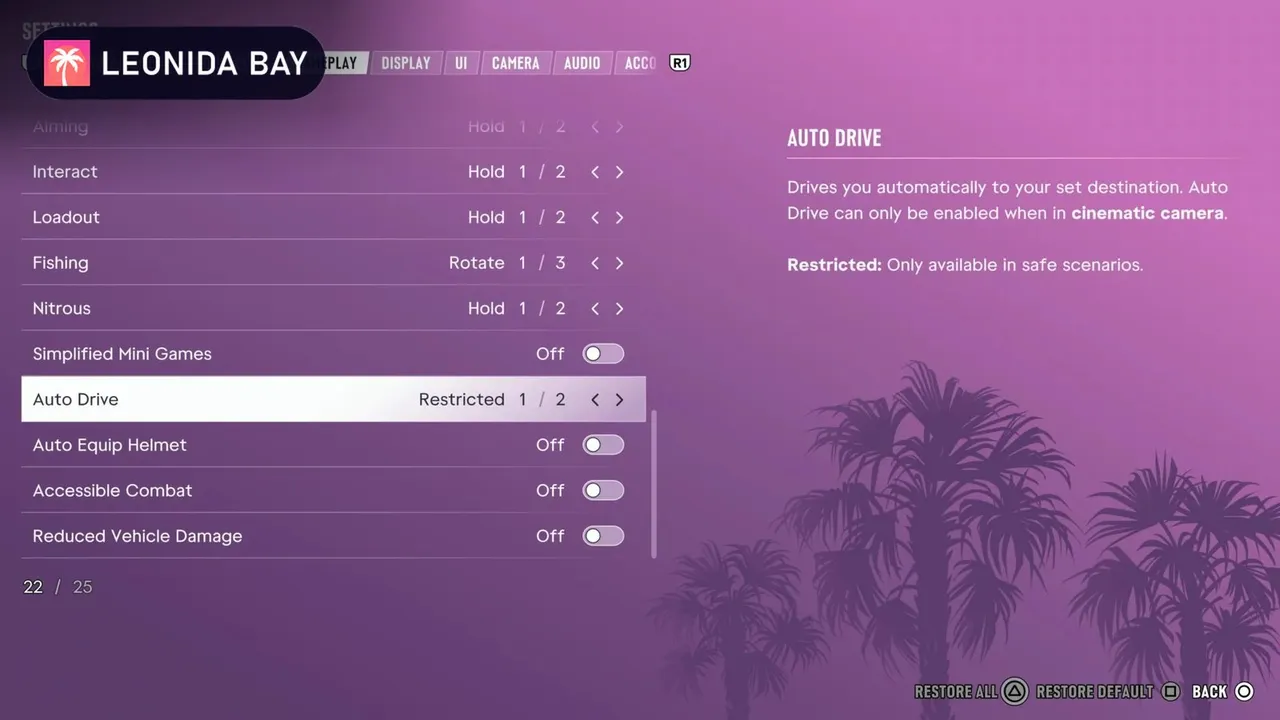
GTA 6 has accessibility options on PS5 and Xbox that simplify mini games, driving and combat, and they don't disable trophies or saving, Kotaku says.
GTA 6 has accessibility options on PS5 and Xbox Series X|S that simplify mini games, driving and combat from the pause menu, and they don't block trophies or saving. Kotaku, a video game news site, describes them in a November 20, 2026 guide.
Rockstar Games released the game on November 19, 2026, and since launch it has reached players with very different levels of skill. Kotaku points out that some of them just want to sightsee around Leonida or follow the story, and that the game's friction can push them to quit. The accessibility settings exist for that moment.
Where are the GTA 6 accessibility options on PS5 and Xbox?
They sit in the pause menu, under settings, and you can use them from the very start of the game, according to Kotaku.
They sit in the pause menu, under settings, and you can use them from the very start of the game, according to Kotaku.
The path is short. Open the pause menu, scroll down to Settings, press RB on Xbox or R1 on PS5 to reach the Gameplay section, then scroll to the bottom, where the Accessibility group lives.
- Where
- Pause, Settings, Gameplay, Accessibility
- Available
- From the start of the game
- Reported by
- Kotaku, November 20, 2026
- Trophies and saving
- Not affected
The four settings Kotaku puts first
Kotaku says to look at Simplified Mini Games, Auto Drive, Accessible Combat and Reduced Vehicle Damage.
Kotaku says to look at Simplified Mini Games, Auto Drive, Accessible Combat and Reduced Vehicle Damage. The first two touch specific activities. The last two change the balance of the whole game.
Simplified Mini Games makes things like exercising, hotwiring vehicles and shooting hoops easier. You no longer have to nail the timing or ease off the analog triggers.
Auto Drive drives for you in relaxed situations, like getting to a mission. Set it to Unrestricted and it also works during a chase or while you're pursuing enemies. The menu warns that the driving AI can still hit objects or other cars, so it's no free pass.
What do Accessible Combat and Reduced Vehicle Damage do?
Accessible Combat lowers enemy health and also the damage you take, so you hit harder and they hit softer.
Accessible Combat lowers enemy health and also the damage you take, so you hit harder and they hit softer. Reduced Vehicle Damage means your car holds up better in collisions and shootouts, and a T-bone or two won't leave it useless.
Both options carry their own warning in the menu, and Kotaku reports it.
The game was not built with this in mind.
Kotaku says turning them on when you don't need them can bore you, because everything gets a lot easier.
They aren't cheats, and trophies stay on
Kotaku separates these options from cheats: you don't have to beat the game or finish specific tasks to unlock them.
Kotaku separates these options from cheats: you don't have to beat the game or finish specific tasks to unlock them. Unlike cheats, they also don't disable trophies or achievements, and they don't stop you from saving.
| Aspect | Accessibility options | Cheats |
|---|---|---|
| Unlocking | Available from the start | Require beating the game or specific tasks |
| Trophies and achievements | Stay active | Get disabled |
| Saving | Allowed | Blocked |
Kotaku adds a warning. Some of these settings can change the balance a lot, and with it how much you enjoy the game.
Less friction if you just want to explore
In practice, you can cross the map or follow the story without getting stuck on a mini game or a chase that won't go…
In practice, you can cross the map or follow the story without getting stuck on a mini game or a chase that won't go your way. You keep trophies and saving, which a cheat wouldn't allow.
If the controls trip you up, the beginner's guide covers the basics. For vehicles, Kotaku notes there are other options that make things like boosting while driving friendlier. Its general advice is that if something gives you trouble, check whether an accessibility option changes how it works.
One sensible approach: switch settings on one at a time. That way you can tell which one helps and which one drains the fun.
What we still don't know about the settings
Kotaku doesn't list every option in the Accessibility group, only the ones it finds most useful.
Kotaku doesn't list every option in the Accessibility group, only the ones it finds most useful. The full list is whatever you see in the menu itself, and nothing needs unlocking to read it.
The practical move is to open Accessibility before your first mission and decide which aids you want. You can go back to that menu at any point in the game.
FAQ
Do GTA 6 accessibility options disable trophies?
No. According to Kotaku on November 20, 2026, they don't disable trophies or achievements and don't stop you from saving, unlike cheats.
How do I turn on GTA 6 accessibility options?
From the pause menu, open Settings, press RB or R1 to reach Gameplay, then scroll to Accessibility, per Kotaku (November 20, 2026). They work from the start.
What does Auto Drive do in GTA 6?
It drives for you in relaxed situations like getting to a mission, and in Unrestricted mode during chases too. Kotaku (November 20, 2026) warns it can still crash.
Cover image: Imran Khan (kotaku.com)
Sources
News like this, recapped weekly in your inbox
Keep reading



Comments0
Be the first to comment.